
A friendly 3D animated character with curly brown hair wearing a blue hoodie, smiling and holding both hands up with open palms.

Ultimate UI Spacing Cheat Sheet

Jan 7, 2026

·

2 min read

Spacing is one of the most underestimated tools in UI design. It directly affects readability, hierarchy, and how polished a product feels. This cheat sheet breaks down the core spacing rules every UX/UI designer should know and apply consistently.

Reality check: Spacing matters

Good spacing is invisible. Bad spacing is immediately noticeable. When spacing is inconsistent or cramped, interfaces feel messy and harder to use, even if colors, typography, and components are well designed.

Spacing isn’t decoration. It’s structure.
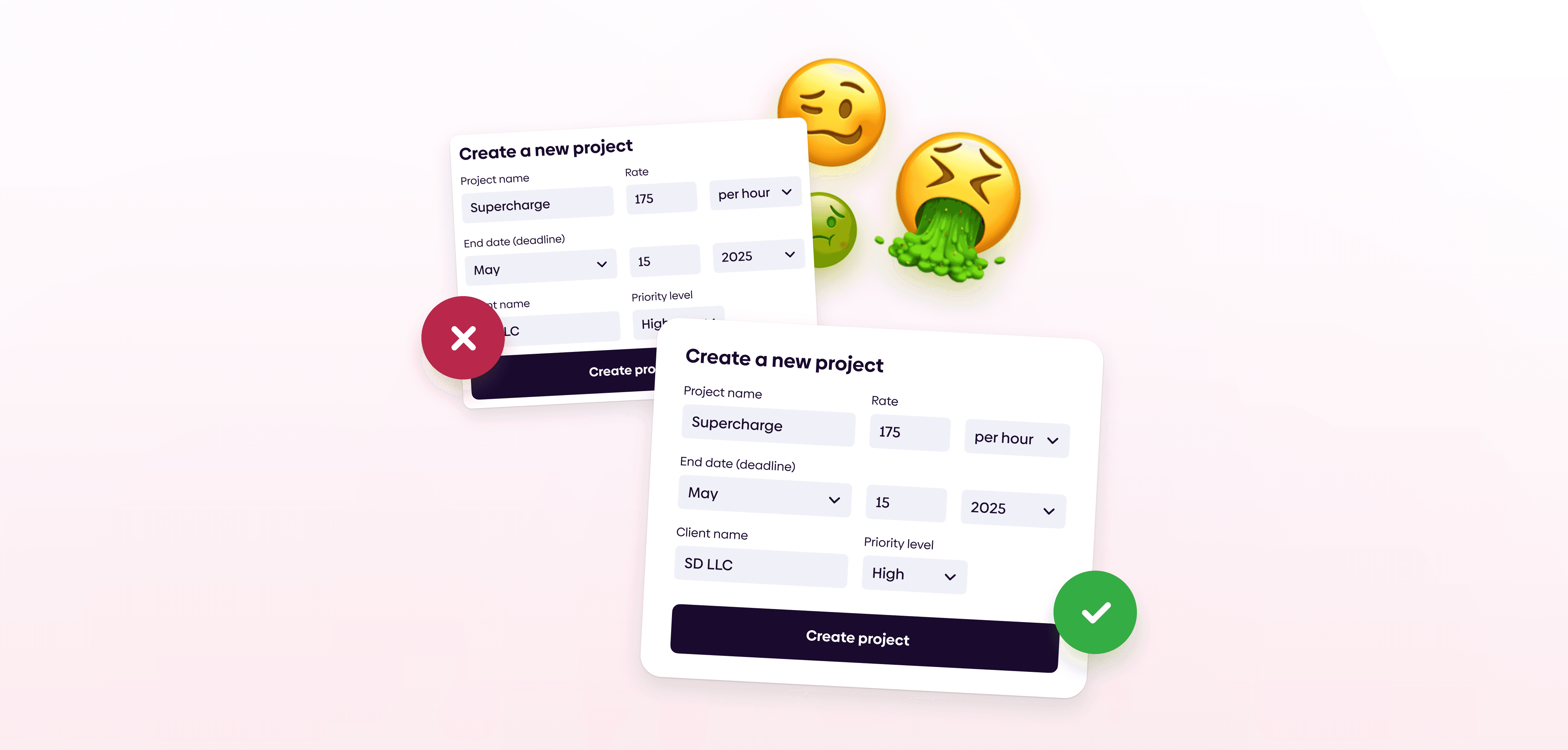
Two “Create a new project” modal forms shown side by side on a light background—one with a red X indicating an incorrect or failed setup, and one with a green checkmark indicating a successful setup—accompanied by expressive emoji illustrating frustration versus success.

Spatial consistency

Build spacing in clear, predictable increments. A 4- or 8-point spacing system helps maintain rhythm and visual balance across the entire interface.

  • Small spacing: inner padding, tiny elements

  • Medium spacing: Large elements, related components

  • Large spacing: sections

Type spacing

Don't ignore text line height settings. Most of the design is text, aim to always make it legible.

  • Body line height: 1.3-1.6 x font size

  • Headline line height: 0.9-1.2 x font size

  • Tiny text line height: 1.4-1.7 x font size

  • Paragraph spacing: 0.3-0.7 x line height

  • Body letter spacing: 0% for most typefaces

  • Headline letter spacing: -2% for most typefaces

Use grids

Grids ensure visual alignment and consistency across screens. They act as a structural guide for placing UI elements in a clear, logical way.

Grid is a visual tool used to align UI elements, based on a sequence of columns and/or rows.
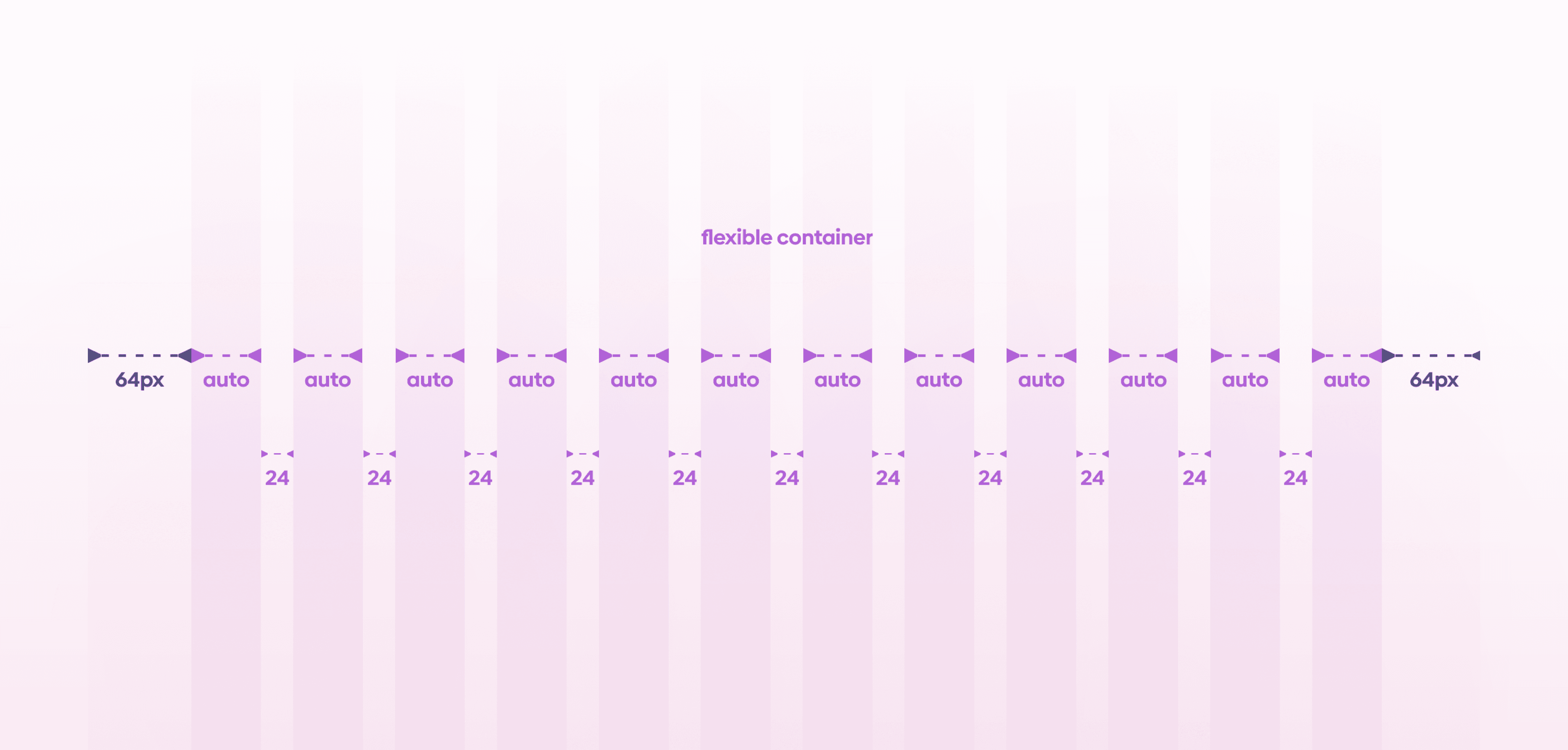
A visual layout grid diagram showing a flexible container with equal columns set to “auto,” 24px gutters between columns, and 64px margins on both the left and right sides, displayed on a light purple gradient background.

Spacing terms you need to know

  • Padding is the inner spacing and the space between elements within a component

  • Margins are spaces outside the content, defining boundaries

  • Columns are vertical guidelines in a grid allocated to content

  • Gutters are spaces between columns serving as separators

Understanding these terms helps teams communicate spacing decisions clearly.

Our tip

Give your UI room to breathe. Whitespace is a designer’s secret weapon. It improves clarity, focus, and perceived quality without adding complexity.

Reality check: Spacing matters

Good spacing is invisible. Bad spacing is immediately noticeable. When spacing is inconsistent or cramped, interfaces feel messy and harder to use, even if colors, typography, and components are well designed.

Spacing isn’t decoration. It’s structure.

Two “Create a new project” modal forms shown side by side on a light background—one with a red X indicating an incorrect or failed setup, and one with a green checkmark indicating a successful setup—accompanied by expressive emoji illustrating frustration versus success.

Spatial consistency

Build spacing in clear, predictable increments. A 4- or 8-point spacing system helps maintain rhythm and visual balance across the entire interface.

  • Small spacing: inner padding, tiny elements

  • Medium spacing: Large elements, related components

  • Large spacing: sections

Type spacing

Don't ignore text line height settings. Most of the design is text, aim to always make it legible.

  • Body line height: 1.3-1.6 x font size

  • Headline line height: 0.9-1.2 x font size

  • Tiny text line height: 1.4-1.7 x font size

  • Paragraph spacing: 0.3-0.7 x line height

  • Body letter spacing: 0% for most typefaces

  • Headline letter spacing: -2% for most typefaces

Use grids

Grids ensure visual alignment and consistency across screens. They act as a structural guide for placing UI elements in a clear, logical way.

Grid is a visual tool used to align UI elements, based on a sequence of columns and/or rows.

A visual layout grid diagram showing a flexible container with equal columns set to “auto,” 24px gutters between columns, and 64px margins on both the left and right sides, displayed on a light purple gradient background.

Spacing terms you need to know

  • Padding is the inner spacing and the space between elements within a component

  • Margins are spaces outside the content, defining boundaries

  • Columns are vertical guidelines in a grid allocated to content

  • Gutters are spaces between columns serving as separators

Understanding these terms helps teams communicate spacing decisions clearly.

Our tip

Give your UI room to breathe. Whitespace is a designer’s secret weapon. It improves clarity, focus, and perceived quality without adding complexity.

If you aren't following us on Instagram already, you're seriously missing out! Become a part of our ever-growing community and learn something new from the field of product design every. single. day.

Happy designing! 🥳

andrija & supercharge design team

If you aren't following us on Instagram already, you're seriously missing out! Become a part of our ever-growing community and learn something new from the field of product design every. single. day.

Happy designing! 🥳

andrija & supercharge design team

10,000+ designers

Stay up to date

Get valuable design tips, exclusive offers, and more—straight to your inbox. We don’t spam and you can unsubscribe at any time.

10,000+ designers

Stay up to date

Get valuable design tips, exclusive offers, and more—straight to your inbox. We don’t spam and you can unsubscribe at any time.

10,000+ designers

Stay up to date

Get valuable design tips, exclusive offers, and more—straight to your inbox. We don’t spam and you can unsubscribe at any time.

10,000+ designers

Stay up to date

Get valuable design tips, exclusive offers, and more—straight to your inbox. We don’t spam and you can unsubscribe at any time.